
Watching jobs
Press w on a job to watch it (w again stops). Watched jobs are listed at the top of the root screen with their last build: number, result, age, duration or a live progress bar, and what triggered it.
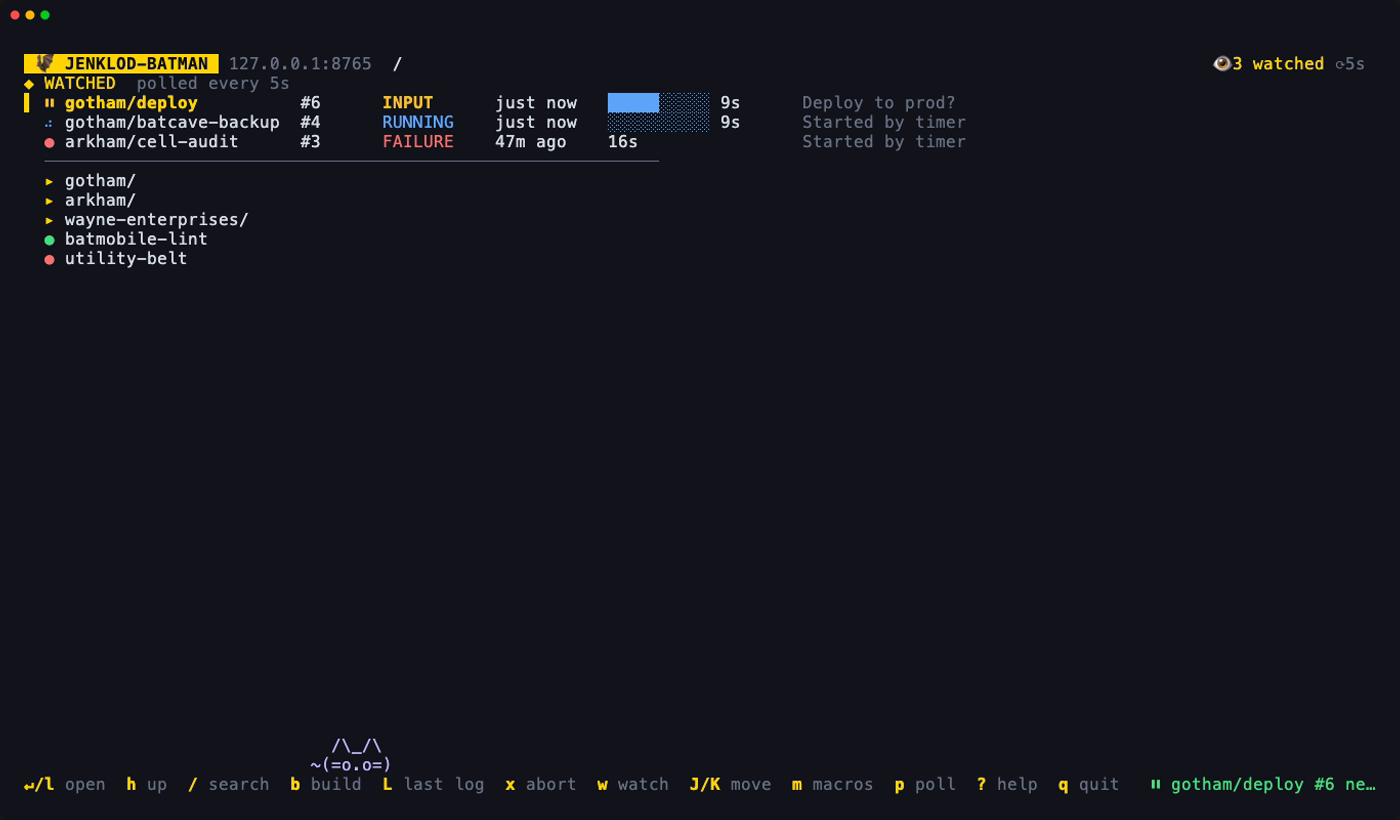
On a watched row:
| Key | Action |
|---|---|
| enter | Open the job as if you had browsed to it, so h goes back to its folder |
| b | Build |
| L | Open the last build's log |
| x | Abort the running build (asks first) |
| w | Stop watching |
| o | Open in the browser |
| J/K | Move it down or up; the order is saved |
If a watched job can't be polled (deleted, renamed, or no longer visible to you), its row shows ✗ and the reason until you stop watching it.
Watched jobs are saved per Jenkins URL, so switching controllers with --setup doesn't mix them.
Polling
While the TUI is open, watched jobs are polled every 10 seconds. p cycles through 5, 10, 20, 30 and 60 seconds. The header shows the current interval (⟳10s), and it's saved as poll_seconds.
Notifications
You get a desktop notification when a watched job's build finishes, and once when it starts waiting for input.
- macOS: Notification Center, through
osascript. If nothing shows up, allow notifications for Script Editor under System Settings → Notifications. - Linux:
notify-send, which works with GNOME, KDE, dunst, mako and others. Install it withapt install libnotify-bin,dnf install libnotifyorpacman -S libnotify.
If notifications can't be shown, the status bar says so once. Events still appear in the app.